Cabecceiras, James. The multimedia library: materials selection and use. 3rd ed. San Diego: Academic Press, 1991.
infoCom: International Communications Industrial Association Inc. AV products.
http://catalogs.infocommiq.com/AVCat/CTL1642/index.cfm
Media & Methods Magazine Online: 2003 Buyers’ Guide & Reference Dictionary
http://www.media-methods.com/bg/index.php
Post, Richard. “Life-span Obsolescence, and Depreciation in the Management of Educational Technology.”
http://www.springerlink.com/content/m0t1x54008n1k501/
Article reprinted from Tech Trends, Sept. 1999 (Vol. 43, No. 4) Contains table of predicted obsolescence of a variety of equipment based on survey of 12 Ohio universities.
School Executive Magazine Online: 2000 Buyers’ Guide http://web.archive.org/web/20030803205308/http://www.schoolexec.com/bg1.html
Also search EBSCOHost for relevant articles.
Dealer Web Sites
Inland AV
http://www.inland-av.com/
Canadian dealer.
Winnipeg Audio-Visual
Local dealer
Listservs
Edtech
http://www.h-net.org/~edweb/
Topics include – notable educational hardware and software, as well as junk one should avoid.
LM Net
http://askeric.org/lm_net/
Dedicated to school library media specialists worldwide, and to people involved with the school library media field. Archives searchable at http://www.eduref.org/
Media-L
http://listserv.binghamton.edu/scripts/wa.exe?A0=MEDIA-L
Focuses on media literacy. Serves as a network for people in the media services profession to ask questions and discuss new procedures or services.
Friday, June 26, 2009

Wednesday, June 24, 2009
Calculating reader/printer costs
For many years, working with information from Buyers Laboratory, Inc., LTR has suggested that the way to determine the real cost-per-copy for prints from a photocopier is to divide the cost of the machine including service contracts and other easily identified direct costs by this number of copies produced by that machine during a five year period. (Five years is an arbitrary period chosen to fully depreciate the machine.) The dividend of this calculation is then added to the cost-per-copy for ma trials only to arrive at a figure that recognizes that you can’t make copies unless you have the machine. Cost-per-copy calculations of this type are done for a range of photocopiers with the results used to select the most appropriate machine for the job to be done. It is not unusual for a machine with a high initial price to be the least expensive on a cost-per-copy basis for a very high volume user and vice versa. Similar calculations can be done with microform reader/printers to determine the real cost for r/p copies and to help in determining the most appropriate machine.
How much should a library charge for r/p copies?
The calculations outlined above could also be used to determine the price to be charged for making r/p prints. A few libraries already use this strategy for pricing photocopies and r/p copies. After determining the real cost-per-copy, these libraries set the price accordingly and retain a portion of the receipts in a sinking fund that can be used to purchase a new machine when the present machine wears out. Libraries that are able to arrange their finances in this way are not faced with large budget requests when a new machine is needed. The users also benefit by having good equipment available.
Several months ago, the editor was in contact with a college librarian who is in charge of an extraordinarily active library microform facility that provides r/p copies for less than a nickel a print. The library’s reader/printers are so heavily used that they must be replaced periodically. The charge covers the cost of supplies and little else so when the machines wear out, the replacement must be a capital expense in that year’s budget. With this volume of copying, if this library were to raise its rates only modesty it could generate enough revenue to replace the machines as they wear out. Most libraries will probably have the opposite problem-low copy volume-so that the price charged per copy will never fully pay for the machine. These calculations might be useful when trying to justify for a price increase or when trying to explain why r/p copies are more expensive than ordinary photocopiers.
Library Technology Reports
July-August, 1991, p. 413.
How much should a library charge for r/p copies?
The calculations outlined above could also be used to determine the price to be charged for making r/p prints. A few libraries already use this strategy for pricing photocopies and r/p copies. After determining the real cost-per-copy, these libraries set the price accordingly and retain a portion of the receipts in a sinking fund that can be used to purchase a new machine when the present machine wears out. Libraries that are able to arrange their finances in this way are not faced with large budget requests when a new machine is needed. The users also benefit by having good equipment available.
Several months ago, the editor was in contact with a college librarian who is in charge of an extraordinarily active library microform facility that provides r/p copies for less than a nickel a print. The library’s reader/printers are so heavily used that they must be replaced periodically. The charge covers the cost of supplies and little else so when the machines wear out, the replacement must be a capital expense in that year’s budget. With this volume of copying, if this library were to raise its rates only modesty it could generate enough revenue to replace the machines as they wear out. Most libraries will probably have the opposite problem-low copy volume-so that the price charged per copy will never fully pay for the machine. These calculations might be useful when trying to justify for a price increase or when trying to explain why r/p copies are more expensive than ordinary photocopiers.
Library Technology Reports
July-August, 1991, p. 413.
Tuesday, June 23, 2009
Non-print equipment & services: Microforms
Required Reading:
Choosing microform readers and reader/printers
South Carolina Department of Archives and History Archives and Records Management division
http://www.state.sc.us/scdah/NINE.PDF
Pros
Conserve space
Wide range of materials
Improved services
Easily converted to print with reader-printer
Less mutilation
Easily replaced
Cons
Specialized equipment/environment required
Equipment maintenance
Variety of standards
Lack of colour
Lack of bibliographic control
User resistance
Microform
An optical information storage medium that contains photographically reduced images.
Microfilm
16mm width of choice for business-oriented applications, technical and industrial libraries
35mm most common size in libraries
Microfiche
A card-shaped sheet of photographic film, usually 3 x 5 or 4 x 6 inches in size, designed to store miniaturized text and/or microimages arranged in a two-dimensional grid pattern. Various formats exist, but ISO recommends 75 x 125 mm (48 frames in four rows of twelve) or 105 x 148 mm (60 frames in five rows of twelve). Although each sheet usually includes a title, index number, or other heading across the top which can be read without magnification, the text itself can be read and copied only with the aid of a microform reader-printer machine. ODLIS http://lu.com/odlis/index.cfm
Micro-opaque
A sheet of opaque material, such as paper or card stock, bearing miniaturized text and/or microimages in a two-dimensional grid pattern, which can be magnified and copied only with the aid of special equipment. Microform reader-printer machines are usually available in libraries with microopaque holdings for viewing and making hard copies. ODLIS http://lu.com/odlis/index.cfm
Silver gelatin
Most popular camera film for source department microphotography
Also known as “silver halide microfilm”
Archival
Inappropriate storage can result in redox blemishes
Diazo
Intended for exclusively for duplication and is most widely used type of film for duplication
Depending on dye used will appear black, blue or sepia
Some types long-term (100 year) potential; some types medium-term (10 year) potential
Will eventually fade, even if stored in the dark. Prolonged exposure to light accelerates fading.
Vesicular
Uses a process involving exposure to ultraviolet light and development by heat
Limited to duplication function
Normally results in reverse polarity of microform being duplicated and most widely used in COM applications where the master is positive and negative working copies are desired
Readily identified by their beige, gray or light blue colour
Some long-term; some medium-term potential
May produce hydrochloric acid
ANSI levels of stability
Choosing microform readers and reader/printers
South Carolina Department of Archives and History Archives and Records Management division
http://www.state.sc.us/scdah/NINE.PDF
Pros
Conserve space
Wide range of materials
Improved services
Easily converted to print with reader-printer
Less mutilation
Easily replaced
Cons
Specialized equipment/environment required
Equipment maintenance
Variety of standards
Lack of colour
Lack of bibliographic control
User resistance
Microform
An optical information storage medium that contains photographically reduced images.
Microfilm
16mm width of choice for business-oriented applications, technical and industrial libraries
35mm most common size in libraries
Microfiche
A card-shaped sheet of photographic film, usually 3 x 5 or 4 x 6 inches in size, designed to store miniaturized text and/or microimages arranged in a two-dimensional grid pattern. Various formats exist, but ISO recommends 75 x 125 mm (48 frames in four rows of twelve) or 105 x 148 mm (60 frames in five rows of twelve). Although each sheet usually includes a title, index number, or other heading across the top which can be read without magnification, the text itself can be read and copied only with the aid of a microform reader-printer machine. ODLIS http://lu.com/odlis/index.cfm
Micro-opaque
A sheet of opaque material, such as paper or card stock, bearing miniaturized text and/or microimages in a two-dimensional grid pattern, which can be magnified and copied only with the aid of special equipment. Microform reader-printer machines are usually available in libraries with microopaque holdings for viewing and making hard copies. ODLIS http://lu.com/odlis/index.cfm
Silver gelatin
Most popular camera film for source department microphotography
Also known as “silver halide microfilm”
Archival
Inappropriate storage can result in redox blemishes
Diazo
Intended for exclusively for duplication and is most widely used type of film for duplication
Depending on dye used will appear black, blue or sepia
Some types long-term (100 year) potential; some types medium-term (10 year) potential
Will eventually fade, even if stored in the dark. Prolonged exposure to light accelerates fading.
Vesicular
Uses a process involving exposure to ultraviolet light and development by heat
Limited to duplication function
Normally results in reverse polarity of microform being duplicated and most widely used in COM applications where the master is positive and negative working copies are desired
Readily identified by their beige, gray or light blue colour
Some long-term; some medium-term potential
May produce hydrochloric acid
ANSI levels of stability
| Archival | Indefinite |
| Long-term | 100 years |
| Medium term | 10 years |
Monday, June 22, 2009
Non-print equipment & services: Tripod movements
 Dolly: to move the camera and tripod (on wheels) toward or away from the subject.
“Dolly in” or “Dolly out”

Truck: to move the camera laterally (on wheels) to the left or right
“Truck left” or “Truck right”
“Truck left” or “Truck right”
 Pan: a horizontal movement of the camera only (While the tripod remains stationary)
“Pan left” or “Pan right”

Tilt: an up and down movement of the camera only (while the tripod remains stationary)
Both panning and tilting adds variety to the image.

Zoom: a movement of the camera le ns to make the image larger and closer or the image smaller and further away
“Zoom in” or “Zoom out”
Tips:
- When doing any of these movements, be sure to move slow and steady.
- Plan the movement ahead of time.
- Do another take without a movement, just in case.
Composition tips 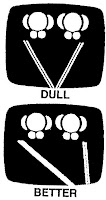
To avoid boring straight-on shots, shoot from a side angle.

To avoid boring straight-on shots, shoot from a side angle.
 To avoid cutting off the top of subject’s head, give some “head room”.

To avoid an unbalanced shot, center subject closer to the middle of the frame.
To avoid your subject running into a “wall”, give some “lead room”.

Terms
Head room: the amount of space on top of subject
Lead room: the amount of space in front of subject
Wednesday, June 17, 2009
Non-print equipment & services: Video camcorder & digital camera comptency
Video camcorder competency
As a library technician you may be called upon to videotape events such as school pageants, awards ceremonies, author readings (with the author’s permission), etc. At the very least you will be expected to be able to show users basic video camera operating techniques.
Digital camera competency
The Sony Mavica MVC-FD73 stores images on high density floppy discs. Storage devices used by other digital cameras include Compact Flash, Secure Digital and Multimedia Cards, Memory Stick, Microdrive, etc. Digital images can be imported to web pages, PowerPoint presentations, word processing documents, etc.
If you require information on transferring files see:
http://web.archive.org/web/20031209014843/http://www.tech4learning.com/snacks/pdfs/transferringimages.pdf
Additional information on digital photography is available on the following sites.
Curtlin, Dennis P. Short courses in digital photography.
http://www.shortcourses.com/index.html
A quick course on many aspects of digital photography.
Kodak Digital Learning Center
http://webs.kodak.com/US/en/digital/dlc/
A collection of online “textbooks” that offer step-by-step tutorials on digital imaging.
Nice, Karin and Gerald Jay Gurevich. How digital cameras work.
http://www.howstuffworks.com/digital-camera.htm
PCPhotoREVIEW.com
http://www.pcphotoreview.com/defaultcrx.aspx
Product reviews written by professionals and consumers. There are also free mini courses on digital photography, ongoing chat rooms, and other features.
As a library technician you may be called upon to videotape events such as school pageants, awards ceremonies, author readings (with the author’s permission), etc. At the very least you will be expected to be able to show users basic video camera operating techniques.
Digital camera competency
The Sony Mavica MVC-FD73 stores images on high density floppy discs. Storage devices used by other digital cameras include Compact Flash, Secure Digital and Multimedia Cards, Memory Stick, Microdrive, etc. Digital images can be imported to web pages, PowerPoint presentations, word processing documents, etc.
If you require information on transferring files see:
http://web.archive.org/web/20031209014843/http://www.tech4learning.com/snacks/pdfs/transferringimages.pdf
Additional information on digital photography is available on the following sites.
Curtlin, Dennis P. Short courses in digital photography.
http://www.shortcourses.com/index.html
A quick course on many aspects of digital photography.
Kodak Digital Learning Center
http://webs.kodak.com/US/en/digital/dlc/
A collection of online “textbooks” that offer step-by-step tutorials on digital imaging.
Nice, Karin and Gerald Jay Gurevich. How digital cameras work.
http://www.howstuffworks.com/digital-camera.htm
PCPhotoREVIEW.com
http://www.pcphotoreview.com/defaultcrx.aspx
Product reviews written by professionals and consumers. There are also free mini courses on digital photography, ongoing chat rooms, and other features.
Tuesday, June 16, 2009
The latest in projection screens
How often do you project visuals on a screen and the images are so pale, they can hardly be seen? Did you know that different projection screens give you different images? There is more to these devices than meets the eye.
Classroom applications
Front projection screens are the most common type of screen found in education. These screens are ideal for projecting LCD projector images. Teachers simply shine the LCD projector image onto the specialty designed screen and the image is clearly visible to large classes. Front projection screens include the following types:
Classroom applications
Front projection screens are the most common type of screen found in education. These screens are ideal for projecting LCD projector images. Teachers simply shine the LCD projector image onto the specialty designed screen and the image is clearly visible to large classes. Front projection screens include the following types:
- Wall-mounted
- Ceiling mounted
- Recessed (hidden above the ceiling, with a slot or trap door through which the screen descends)
- Fixed (mounted to the wall in frame)
- Motorized or manually-operated (pull down or using a crank)
The biggest benefit of using a projection screen is size. With the proper screen and projector combination, an image can be six feet wide, eight feet wide, or more. The screens also make projected images brighter than a wall or standard pull-down materials since they have white or glass bead surfaces to better illuminate surfaces.
At the New Castle Middle School in New Castle, IN, projection screens are used in many ways. Teachers use the screens to introduce their web pages at the beginning of the school year. By pointing to various features on the projected image, students learn how to use homework helpers, get their grades or e-mail questions to the teacher.
Since individual computers may not necessarily be in use during a class period, websites can be reviewed and discussed with a whole class by projecting sites onto a screen from an LCD projector. The screens are also used for staff training and meetings.
Selecting the right screen
There are many types of screen surfaces and sizes, so choosing the right surface depends on several variables. Sizes and materials depend on room size, how much ambient light there is in the classroom, what kind of projector is being used (and if the projector is ceiling mounted or on a cart on the floor) and what kind of images are going to be projected.
In a classroom, fiberglass matt surface white wall or ceiling mounted screens are usually best. When overhead projections is being used, the glass beaded surface is not recommended. The reflective material, plus the bright white background, will cause a bright hot spot in the center of the screen. Matt white also has the major benefit of being washable.
Choose a screen that best handles your room’s needs such as size, operation (i.e. fixed frame, manual roll-up or electric roll-up) and mounting (i.e. ceiling mounted, wall mounted, or floor mounted). Determine if the seating area will require the viewers to watch the projected image from a narrow versus a wider angle of more than 30 degrees from either side of the center of the screen. A screen with a wider viewing angle – with a more uniform presentation across the screen – means more people can see clearly.
Whether you are using a state-of-the-art multimedia projector or a ten-year-old overhead projector, the right screen definitely affects any school presentation and bring it to glorious life.
Projection screen distributors
Audio Video Associates
888/435-1519 www.avaonline.com
Circle Number 320
Da-Lite Screen Co., Inc.
800/622-3737
www.da-lite.com
Circle Number 321
Draper Inc.
800/238-7999
www.DraperInc.com
Circle Number 322
PolyVision Corporation
800/679-6226
www.thescreenworks.com
Circle number 324
Vultec Corp.
800/770-4700
www.vutec.com
Circle number 325
By Greg Allen
Greg Allen is a social studies teacher at New Castle Middle School, New Castle District in New Castle, Inc.
Friday, June 12, 2009
Non-print equipment & services: Video supplementary resources
Dictionary@AudioVideo101
http://www.audiovideo101.com/dictionary/default.asp
Brain Marshall. How television works.
http://entertainment.howstuffworks.com/tv.htm
Brain Marshall. How VCRs work.
http://entertainment.howstuffworks.com/vcr.htm
Harris, Tom. How Camcorders work.
http://electronics.howstuffworks.com/camcorder.htm
Nice, Karin. How DVDs work.
http://entertainment.howstuffworks.com/dvd.htm
TV/VCR Connections
http://teachnet.edb.utexas.edu/~medialab/tutorials/tvcr.htm
Van Horn, Royal. “A Primer on the new television”. Phi Delta Kappan; Sep. 2002, Vol. 85 #1 p.7-8. Available fulltext from EBSCOHost MasterFile Elite.
http://www.audiovideo101.com/dictionary/default.asp
Brain Marshall. How television works.
http://entertainment.howstuffworks.com/tv.htm
Brain Marshall. How VCRs work.
http://entertainment.howstuffworks.com/vcr.htm
Harris, Tom. How Camcorders work.
http://electronics.howstuffworks.com/camcorder.htm
Nice, Karin. How DVDs work.
http://entertainment.howstuffworks.com/dvd.htm
TV/VCR Connections
http://teachnet.edb.utexas.edu/~medialab/tutorials/tvcr.htm
Van Horn, Royal. “A Primer on the new television”. Phi Delta Kappan; Sep. 2002, Vol. 85 #1 p.7-8. Available fulltext from EBSCOHost MasterFile Elite.
Subscribe to:
Posts (Atom)